The spring of 2012, the Barnesville School Board approved the "MOVE 21"
initiative for our school district. Roughly 900 iPads were ordered, and
students and staff were at the beginning of a new adventure indeed.
Teachers left here with an iPad and Macbook Pro in hand to learn and
become familiar with during the summer, and the students left for the
summer with anticipation of what next year might look like.
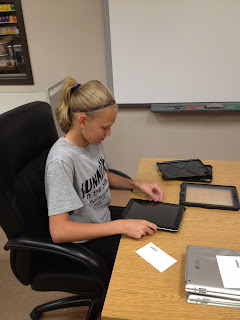
We finally got the iPads in June, so we brought students in to help code, case and count all of them. They worked diligently and professional, and in two days we had them all complete. The process was quite efficient: one student unpackaged each iPad and checked serial numbers to make sure they all matched. Two of use put the iPads into our Destiny Quest library system and put the bar codes on the iPad and an index card that was to stay with the iPad until they were checked out. Five or six students then put the iPads in cases. We bought the Griffin case that was created by the military to withstand just about anything. (This was BY FAR the best thing we did:)) After the cases were on, they were piled in the back room until the distribution dates were here.
The last week in July and the first two weeks in August were the dates that we chose to distribute the iPads for our students in Grades 4-12. EVERY student had to come in and go through about an hour training session that covered the rules, policies and expectations of iPads and their use. Students then were able to check out and take home their iPads. Students in Grades K-3 had similar training, but the iPads have remained in the classrooms. The idea is for Grade 2-3 to bring their iPads home after conferences, and students in Grade K-1 around Thanksgiving. Our PTA is purchasing a neoprene sleeve in addition the Griffin case for the students to carry them home in their backpacks with.
So far so good - as of today - we have only had to replace 3 iPads; one didn't rotate, one the home button was sticky, and the other one wouldn't charge. That's pretty good considering the quantity that we ordered!
Here are some pictures I took of the workers that came it - WHAT AN AMAZING GROUP OF KIDS! This was KEY to our success and time management for distribution!




We finally got the iPads in June, so we brought students in to help code, case and count all of them. They worked diligently and professional, and in two days we had them all complete. The process was quite efficient: one student unpackaged each iPad and checked serial numbers to make sure they all matched. Two of use put the iPads into our Destiny Quest library system and put the bar codes on the iPad and an index card that was to stay with the iPad until they were checked out. Five or six students then put the iPads in cases. We bought the Griffin case that was created by the military to withstand just about anything. (This was BY FAR the best thing we did:)) After the cases were on, they were piled in the back room until the distribution dates were here.
The last week in July and the first two weeks in August were the dates that we chose to distribute the iPads for our students in Grades 4-12. EVERY student had to come in and go through about an hour training session that covered the rules, policies and expectations of iPads and their use. Students then were able to check out and take home their iPads. Students in Grades K-3 had similar training, but the iPads have remained in the classrooms. The idea is for Grade 2-3 to bring their iPads home after conferences, and students in Grade K-1 around Thanksgiving. Our PTA is purchasing a neoprene sleeve in addition the Griffin case for the students to carry them home in their backpacks with.
So far so good - as of today - we have only had to replace 3 iPads; one didn't rotate, one the home button was sticky, and the other one wouldn't charge. That's pretty good considering the quantity that we ordered!
Here are some pictures I took of the workers that came it - WHAT AN AMAZING GROUP OF KIDS! This was KEY to our success and time management for distribution!


Comments
Post a Comment