NoRedInk - CHECK IT OUT!!!

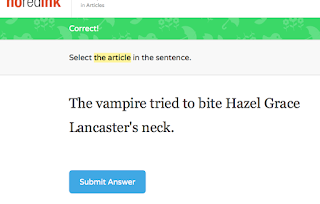
SO - Mrs. Gross, an English teacher here, learned about the site NoRedInk at TIES a few years ago.  She told me about it then, but I had learned many other things I wanted to check out first, so I book marked it and moved on to what I had seen and we both put it on the back burner.  Well, she "rediscovered" it a few days ago and IS. LOVING. IT!!!  In a nutshell, NoRedInk is a website that has grammar practice on it for kids - BUT - it uses things they're interested in for the questions asked.  For instance,  I selected Harry Potter, Phineas and Ferb, and The Fault in Our Stars as my "topics," so everything that I am reading and answering has these characters in it - DYING HERE AND BIG SMILING EMOJI:)!!  Look at these screen shots to get an idea:


I am STILL totally LAUGHING! OUT! LOUD! as I type this- good humor for a Thursday:)  Basically like EVERY great website, they give you "teasers" for free and then have a charge for you.  We were FLAT OUT turned down as we are a "smaller" district and you have to have at least 200 students to get the paid version, and we're pursuing it and bugging them because it's AWESOME!  Basically you go in, set up a free account where you get an access code, then you can differentiate where you want, assign assignments, etc... pretty cool way to review/learn grammar:)!  Here's a few screenshots of what is there to choose from - remember this is a free account so it's going to have limited topics for each area - but you get the idea:
OOPS forgot one of the AMAZING features, when doing the practice - it also provides a lesson for each topic so if the kiddos forgot what a specific topic means, or is unclear about something, etc... they can quickly have a reminder:
WORTH THE TIME TO CHECK OUT!!  LOVE LOVE LOVE IT:!)

Happy Thursday all -
Mrs. I:)

Comments

Popular posts from this blog

Chirp App for iPhone/iPad

    Alright, Mrs. Askegaard and some other teachers attended a math workshop yesterday on math apps and a little app called Chirp was presented and shared!   She stopped in today and talked to me a little bit about it so of course I had to download it and play!   THANK YOU MRS. ASKEGAARD FOR SHARING LOVE IT:)!!!  This little app might be my new favorite (sorry QR codes)!  What this app does is allow you to share photos, notes (that you type on the spot, not existing ones), and links via a "chirp" to anyone else that has the Chirp app open and is on the same Wi-Fi network.  The app works via sound waves, so it will actually chirp like a bird when it has sent and received a new message, photo or note.  SO COOL!!!  Best part as usual - FREE:)!!!  Now, I clearly need to do some more research with this, and check for safety, etc.. but I can see SO many ways that this would be a HUGE benefit in a classroom with students; collaborative pr...

Starfall Website......

  I am not sure if I have shared this website with you, but our Kindergarteners are ROCKING IT OUT!  The site is Starfall and it has SO much great content on here.  Below is a list of content for the little ones:    The kiddos today were working on the Learn to Read section.  They had to listen to words, add beginning and ending sounds, and read stories and click and find things as they went.  They were TOTALLY engaged!  They even had a checklist to do once sections were completed to track their progress.    A SUPER fun one for the kiddos is preK-1st grade I would say FOR SURE:)! Bad news - NO iPad as it's flash based:(  - but still PLEASE CHECK IT OUT Happy Monday and night, Mrs. I:)

CodeHS - Great Site for High School Students

We have been looking for something in regards to coding for our senior high school students.  They have been having fun playing with the Sphero and the Dash and Dot , but they are a little old for this so to say.  Through my research, I came across a site called CodeHS .  THIS IS AMAZING:)!!!  Once you sign up, you are taken through a series of courses where you actually code.  You type in the commands and functions, trying to walk Karel, the dog, through various tasks.  Each section features a video explaining what you'll learn, a quiz to review, and then you step in and use what you learned to code Karel.  This seems like a really good fit for some of our kids.  We have two that are going into Computer Science, and this seems like a perfect stepping stone as it introduces HTML , Javascript and Python as they are also areas they will learn:). AND the best part - it's DONE FOR YOU and IT'S FREE!! Of COURSE you can pay for more, but i...